


If you allow users to upload files, you need to make sure your website is secure against common file upload attacks. This post helps you identify potential issues and shows you how to fix them.
I will describe the most secure way to implement an upload API. You can apply this directly if you are creating an upload API endpoint from scratch.
You might already have developed an upload API, and you find it difficult to alter the existing code to conform to this ideal API controller. We still urge you to follow the directions given in the “file storage” section. You should also make sure to check file access permissions.
Database structure
Yes, you probably need to store information related to the upload API in the database. How else can you keep track of who uploaded what file? We can distinguish various scenarios here:
One user one file
This section is for when your upload API allows the user to upload only one file. For example, this applies to profile picture uploads. A user can only have one profile picture.
This case is very simple, you can just add a column in the user’s database called “profile_picture”.
When a user uploads a new profile picture, you update the user’s “profile_picture” value by storing the file name in it. The file name should be generated randomly as explained in the section below.
One user multiple files
If your users can upload multiple files on your application, you need a dedicated database table to store related data.
This table should have at least 5 columns, you can add more columns if you need to save more context on the files or on the upload operation itself. The 5 essential columns are “file_id”,”user_id”, ”filename”, ”upload_date”, “original_filename”. You can create such a table using the following SQL query:
CREATE TABLE files (

  file_id int NOT NULL AUTO_INCREMENT,

  user_id int NOT NULL,

  original_filename varchar(255) NOT NULL,

  filename varchar(255) NOT NULL,

  upload_date datetime NOT NULL,

  PRIMARY KEY (file_id)

)
When a user uploads a file, you create a new row in this table. This row should contain the uploading user’s ID, the user’s provided filename, the randomly generated filename (more on that later), and the date of the upload.
Same file multiple users
If your application allows users to upload files, and those files can then be accessed by other users, a more complex access right table might be needed.
Depending on the business logic of the feature, you might not need this table. Use common sense.
For example, if files can be accessed by users in the same company, there is no need to add a table to manage each user’s access rights to the file. Just check, on the download API, if the user belongs to the same company as the user who uploaded the file.
If your application allows users to share their files with specific users (like dropbox), then you might want to create an access control table. This is in addition to the “files” table described in the previous section. The new table should contain, at least, the following rows: “file_permission_id”,”file_id”,”user_id”,”permission”. You can create such a table using the following SQL query:
CREATE TABLE file_permissions (

  file_permission_id INT NOT NULL AUTO_INCREMENT ,

  file_id INT NOT NULL ,

  user_id INT NOT NULL ,

  permission ENUM('READ','DELETE','EDIT','FULL_CONTROL') NOT NULL ,

  PRIMARY KEY (file_permission_id)

)
As described in the previous section, when a user uploads a file, you should create a new row in the files table. Then, add a new permission in the “file_permissions” table. This row should contain the uploading user’s ID, the newly created file_id, and the permission “FULL_CONTROL”.
You should have another API endpoint that allows a user to share his files with other users. When the owner of a file grants another user access to the file, you should add a new row in the permissions table for the designated user and the involved file and the defined role (READ/DELETE/EDIT/FULL_CONTROL).
File storage
Now, we will discuss how we should store the files.
Don’t expose the Upload folder
If we’re not careful, our web server might directly expose the uploaded files. Users can thus guess the name of a file, and access it directly with a URL of the form https://www.example.com/uploads/user_uploaded_file.pdf.
This configuration renders our access control database table completely useless. Independent of a user’s rights over the file, he can download it to his computer. He can download files even if he doesn’t have an account on your application.
To make our access control solution efficient, we need to make sure our download API is the only way users can access uploaded files. A download API can be as simple as a controller that sends back a user’s profile picture, or as complex as a Dropbox-like download page with file preview.
Depending on your solution, you need to configure the web server (Apache/nginx/Microsoft IIS/Express …) to not directly serve files from the upload folder.
On an apache server, for instance, you can create an .htaccess file inside the “/uploads” folder, containing the following configuration:
Require all denied
Authentication and Authorization
This should be obvious, but here is a reminder:
- If your application only allows authenticated users to upload files, then check, at the beginning of the upload process, that the user is authenticated.
- If your application only allows users with a certain privilege to upload files, then check, at the beginning of the upload process, that the user has the required privileges.
Limit file size
To avoid overwhelming your server storage with huge files, set a file size limit for uploaded files. This limit is highly dependent on your application context and what type of files you allow users to upload.
Profile pictures for example do not require a lot of space, you can limit those files to 10MB.
Other files your application can allow might take more space (models and databases for machine learning, video files for streaming websites …). You might want to limit the overall file size allowed per account (like what email providers do), and allow the user to purchase more storage space if needed.
File extension whitelist
If you know what type of files you are expecting, make sure to only allow users to upload files with the expected file extension. If a user tries to upload an image, only accept image file extensions. If a user tries to upload a list of elements, only accept .cvs or .xlsx files …
If possible, try to implement a whitelist strategy, and not a blacklist one. Have a list of accepted extensions ready, and check that the user’s file extension is in that list.
Check the file format
When receiving a file from the user, check if the file conforms to what you were expecting. This is dependent on your application and its context. If you allow users to upload profile pictures, check that the file sent is really a picture. If you were expecting a .csv file to import data, check if the data within the file are in csv format and respect your specs.
Random name generation
Before saving the uploaded file on your server, give it a random file name. The filename should not include any file extension. This removes all the risks associated with trusting the filename that the (potentially malicious) user provides us.
Scan for viruses (optional)
If you allow users to share uploaded files with each other, and you want to protect the users of the platform, you should scan uploaded files for viruses. Malicious users could use your website to store and distribute malicious files. They would hope that other users would download those malicious files and thus infect their computers.
The simplest way to accomplish this, on your application server (or a server you control), is to use ClamAV(https://www.clamav.net/).
Cloud file storage
If you don’t store the uploaded files directly on your server, but store them on a cloud file storage solution (AWS S3, Google Cloud Storage, Azure Blob Storage …), then the above tips still apply.
In Particular, you need to make sure that your storage is not publicly exposed, and that only your application (your application specific API key) can access files on the file storage.
A full implementation
We implemented a full upload API for you using the principles discussed above:
from django.http.response import JsonResponse
from rest_framework.parsers import JSONParser
from rest_framework import status

import os

from users.models import User
from users.serializers import UserSerializer

from rest_framework.decorators import api_view

from users import registry
from candyshop import utils, settings

import uuid

from PIL import Image

@api_view(['POST'])
def upload(request):

    extension_whitelist = ["png", "jpg", "jpeg"];
    upload_folder = "/var/www/uploads/";

    # Check if file present in the request

    if not "picture" in request.FILES:
        return JsonResponse({'error_message':'No file present','success':False}, status=401)

    upload_file = request.FILES["picture"]

    # Check if user is authenticated

    user = request.session.get('user', None)
    if user == None:
        return JsonResponse({'error_message':'Authentication is required for this action','success':False}, status=401)

    # Check if the file size exceeds the maximum allowed

    if uploaded_file.size > 10485760:
        return JsonResponse({'error_message':'File too big, at most 10MB are allowed','success':False}, status=401)

    # Check if the file extension is in the allowed extensions

    filename, extension = os.path.splitext(uploaded_file.name)

    if extension not in extension_whitelist:
        return JsonResponse({'error_message':'Forbidden file extension','success':False}, status=401)

    # Check if we received a valid image file

    try:
        im = Image.open(upload_file)
    except IOError:
        return JsonResponse({'error_message':'Invalid picture file','success':False}, status=401)

    # Generate random file name

    new_file_name = str(uuid.uuid4())+"."+extension

    # Save file on the file system, with the generated name

    with open(os.path.join(upload_folder, new_file_name), 'wb+') as destination:
        for chunk in uploaded_file.chunks():
            destination.write(chunk)

    # Save the file name in the user's database record

    user_record = User.objects.get(pk=user.user_id)
    user_record.profilePicture = new_file_name
    user_record.save()

    return JsonResponse({'success':True})

@api_view(['GET'])
def download(request):

    upload_folder = "/var/www/uploads/";

    # Check if user is authenticated

    user = request.session.get('user', None)
    if user == None:
        return JsonResponse({'error_message':'Authentication is required for this action','success':False}, status=401)

    # Get the path to the user file from his database record

    user_record = User.objects.get(pk=user.user_id)
    profile_pic_path = user_record.profilePicture

    # Read the file and send it back to the user

    file_path = os.path.join(upload_folder, profile_pic_path)

    if os.path.exists(file_path):
        with open(file_path, 'rb') as fh:
            response = HttpResponse(fh.read(), content_type="application/force-download")
            response['Content-Disposition'] = 'inline; filename=' + os.path.basename(profile_pic_path)
            return response

    return JsonResponse({'error_message':'No profile picture found','success':False}, status=401)
from django.http.response import JsonResponse
from rest_framework.parsers import JSONParser
from rest_framework import status
import os
from users.models import User
from users.serializers import UserSerializer
from rest_framework.decorators import api_view
from users import registry
from candyshop import utils, settings
import uuid
from datetime import datetime
import imghdr
@api_view(['POST'])
def upload(request):
extension_whitelist = ["doc", "docx", "pdf"];
upload_folder = "/var/www/uploads/";
# Check if file present in the request
if not "picture" in request.FILES:
return JsonResponse({'error_message':'No file present','success':False}, status=401)
upload_file = request.FILES["picture"]
# Check if user is authenticated
user = request.session.get('user', None)
if user == None:
return JsonResponse({'error_message':'Authentication is required for this action','success':False}, status=401)
# Check if the file size exceeds the maximum allowed
if uploaded_file.size > 10485760:
return JsonResponse({'error_message':'File too big, at most 10MB are allowed','success':False}, status=401)
# Check if the file extension is in the allowed extensions
filename, extension = os.path.splitext(uploaded_file.name)
if extension not in extension_whitelist:
return JsonResponse({'error_message':'Forbidden file extension','success':False}, status=401)
# Check if we received a valid document file
guessed_extension = imghdr.what(uploaded_file)
if guessed_extension != extension :
return JsonResponse({'error_message':'Invalid file format','success':False}, status=401)
# Generate random file name
new_file_name = str(uuid.uuid4())+"."+extension
# Save file on the file system, with the generated name
with open(os.path.join(upload_folder, new_file_name), 'wb+') as destination:
for chunk in uploaded_file.chunks():
destination.write(chunk)
# Save the file in the database table 'files'
file_record = File(
user_id=user.user_id
file_name=new_file_name,
upload_date=datetime.datetime.now(),
original_file_name=filename
)
file_record.save()
return JsonResponse({'success':True})
@api_view(['GET'])
def download(request):
upload_folder = "/var/www/uploads/";
# Check if user is authenticated
user = request.session.get('user', None)
if user == None:
return JsonResponse({'error_message':'Authentication is required for this action','success':False}, status=401)
file_id = request.GET.get('file_id', '')
# Get the file details from the database
file_records = File.objects.get(pk=user.file_id)
if len(file_records) == 0:
return JsonResponse({'error_message':'File not found','success':False}, status=401)
# Check if the file belongs to the user requesting the file
if file_records.user_id != user.user_id:
return JsonResponse({'error_message':'Access denied','success':False}, status=401)
# Read the file and send it back to the user
file_path = os.path.join(upload_folder, file_records.file_name)
if os.path.exists(file_path):
with open(file_path, 'rb') as fh:
response = HttpResponse(fh.read(), content_type="application/force-download")
response['Content-Disposition'] = 'inline; filename=' + file_records.original_file_name
return response
return JsonResponse({'error_message':'File not found','success':False}, status=401)from django.http.response import JsonResponse
from rest_framework.parsers import JSONParser
from rest_framework import status
import os
from users.models import User
from files.models import FilePermissions
from files.models import File
from users.serializers import UserSerializer
from rest_framework.decorators import api_view
from users import registry
from candyshop import utils, settings
import uuid
from datetime import datetime
import imghdr
@api_view(['POST'])
def upload(request):
extension_whitelist = ["doc", "docx", "pdf"];
upload_folder = "/var/www/uploads/";
# Check if file present in the request
if not "picture" in request.FILES:
return JsonResponse({'error_message':'No file present','success':False}, status=401)
upload_file = request.FILES["picture"]
# Check if user is authenticated
user = request.session.get('user', None)
if user == None:
return JsonResponse({'error_message':'Authentication is required for this action','success':False}, status=401)
# Check if the file size exceeds the maximum allowed
if uploaded_file.size > 10485760:
return JsonResponse({'error_message':'File too big, at most 10MB are allowed','success':False}, status=401)
# Check if the file extension is in the allowed extensions
filename, extension = os.path.splitext(uploaded_file.name)
if extension not in extension_whitelist:
return JsonResponse({'error_message':'Forbidden file extension','success':False}, status=401)
# Check if we received a valid document file
guessed_extension = imghdr.what(uploaded_file)
if guessed_extension != extension :
return JsonResponse({'error_message':'Invalid file format','success':False}, status=401)
# Generate random file name
new_file_name = str(uuid.uuid4())+"."+extension
# Save file on the file system, with the generated name
with open(os.path.join(upload_folder, new_file_name), 'wb+') as destination:
for chunk in uploaded_file.chunks():
destination.write(chunk)
# Save the file in the database table 'files'
file_record = File(
user_id=user.user_id
file_name=new_file_name,
upload_date=datetime.datetime.now(),
original_file_name=filename
)
file_record.save()
permission_record = FilePermissions(
file_id = file_record.file_id,
user_id = user.user_id,
permission = "FULL_CONTROL"
)
permission_record.save()
return JsonResponse({'success':True})
@api_view(['GET'])
def download(request):
upload_folder = "/var/www/uploads/";
# Check if user is authenticated
user = request.session.get('user', None)
if user == None:
return JsonResponse({'error_message':'Authentication is required for this action','success':False}, status=401)
file_id = request.GET.get('file_id', '')
# Check the user's permission on the file
file_records = FilePermissions.objects.filter(user_id=user.user_id, file_id=file_id)
if count(file_records)==0:
return JsonResponse({'error_message':'Access denied','success':False}, status=401)
if file_records[0].permission != "FULL_CONTROL" and file_records[0].permission != "READ":
return JsonResponse({'error_message':'Access denied','success':False}, status=401)
# Read the file and send it back to the user
file_path = os.path.join(upload_folder, file_records.file_name)
if os.path.exists(file_path):
with open(file_path, 'rb') as fh:
response = HttpResponse(fh.read(), content_type="application/force-download")
response['Content-Disposition'] = 'inline; filename=' + file_records.original_file_name
return response
return JsonResponse({'error_message':'File not found','success':False}, status=401)Path traversal
You might have an existing upload API where you absolutely need to save uploaded files under the name that the user provides. In that case, you need to protect your application from path traversal attacks. As we always say, user input is evil. You can’t trust the user to not alter the file name. We’ll use an example to explain this attack.
Let’s take the following vulnerable file upload controller:
@api_view(['POST'])
def upload(request):

    upload_folder = "/var/www/uploads/";

    upload_file = request.FILES["file_to_upload"]

    destination_path = upload_folder + uploaded_file.name

    with open(destination_path, 'wb+') as destination:
        for chunk in uploaded_file.chunks():
            destination.write(chunk)

    return JsonResponse({'success':True})
It might seem that the API endpoint puts uploaded files inside the /var/www/uploads/ folder. However, when using the ../ characters, we can circumvent this restriction and escape the path we were assigned to. In Linux, the characters ../ allow us to go up the folder hierarchy. The same can be achieved in a Windows server using the ..\ characters.
For reference, here’s what a raw HTTP file upload request would look like:
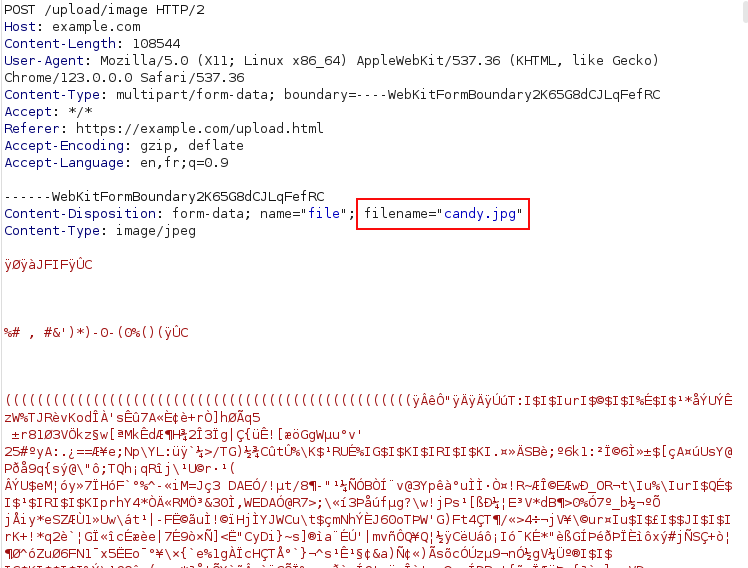
We can see that the user can put any value he wants as the filename. Thus, he could upload a file with the name “../index.html”. Our API controller will save the file, on the server, using the path “/var/www/uploads/../index.html”. This path resolves to “/var/www/index.html”, and the controller thus replaces the index.html file with the file provided by the user.
By exploiting this vulnerability, the attacker can create new files, or even replace existing files.
What’s the risk of path traversal?
The worst case scenario, the user can compromise your whole application. He might upload files that get interpreted by your webserver.
For instance, your web server might be configured to interpret PHP files. Suppose the user uploads a malicious PHP file on a folder exposed by the web server, for example "/var/www/uploads/../script.php". The attacker can execute the malicious PHP script by visiting the script URL https://www.example.com/script.php in his browser.
Malicious server-side scripts can retrieve server credentials, directly access the database, steal user credentials …
If server-side code interpretation is somehow not possible, then the user can still upload malicious HTML pages. These pages contain malicious Javascript code that runs on the victims’ browsers. When a user of your application visits one of these pages, the malicious Javascript can force his browser to execute actions on the application, using the victim’s identity on the website (delete objects, give permissions to the attacker, change the victim’s password …).
How to fix path traversal?
If possible, don’t save the file using the filename that the user provides. Generate a random filename with no extension, and use that to save the file. You can store the original filename in the database to use when the user downloads his file.
If this solution is not possible for you, then you need to check the real path of the filename.
The real path is the filesystem path that you get after resolving all the path traversal characters. For example, the real path of "/var/www/upload/../../../../../../../etc/passwd" is "/etc/passwd".
The real path is a string that needs to start with the upload folder you defined. If not, you need to abort the upload operation and return an error message. Here’s how you could implement this fix on the controller shown earlier:
@api_view(['POST'])
def upload(request):

    upload_folder = "/var/www/uploads/";

    upload_file = request.FILES["file_to_upload"]

    destination_path = upload_folder + uploaded_file.name

    real_path = os.path.abspath(destination_path)

    if not real_path.startswith(upload_dir):
        return JsonResponse({'error_message':'Path traversal attempt','success':False}, status=401)

    with open(real_path, 'wb+') as destination:
        for chunk in uploaded_file.chunks():
            destination.write(chunk)

    return JsonResponse({'success':True})




Leave a Reply